When I left Podia (affiliate link) and rebuilt my website with AI at the end of June, I also did a big cleanup. One page I had planned on moving was my portfolio. Except, it only showed the Podia websites I built for clients... Since I was moving off Podia, it felt a little weird to recreate it somewhere else. So I left it there, and didn't create a new page.
After this initial AI-build, I kicked my AI coding up a notch and without meaning to, my summer turned into a vibe-coding summer. And by the end of August, I felt the urge to have a place to display all of my projects.
Let's take a detour and talk about that for a second.
I believe strongly in displaying what you make. Even if it's not stuff you're going to turn into products or public tools. Because that's how you make a technology useful to more people. Especially with AI. When someone wants to learn, they have access to many tutorials explaining technical jargon and new functions, but they don't actually know what they could actually end up building.
Let me be honest, it's been a frustration of mine.
I've combed through podcast episodes and conference talks to understand it all, and the stuff that had the most impact on me was always just someone showing the end result. It's one of my beefs with educational content in general: you gotta make people EXCITED by what they could make if you want them to pay attention.
Anyway, I'm eager to find more portfolios from people using AI in fun, highly specific and weird ways. (I should do a roundup of the people I've already found in this space - note for later).
All of this to say, I've made a portfolio with all the stuff I've built this year. And I surprised myself when I saw how much stuff was already on there.
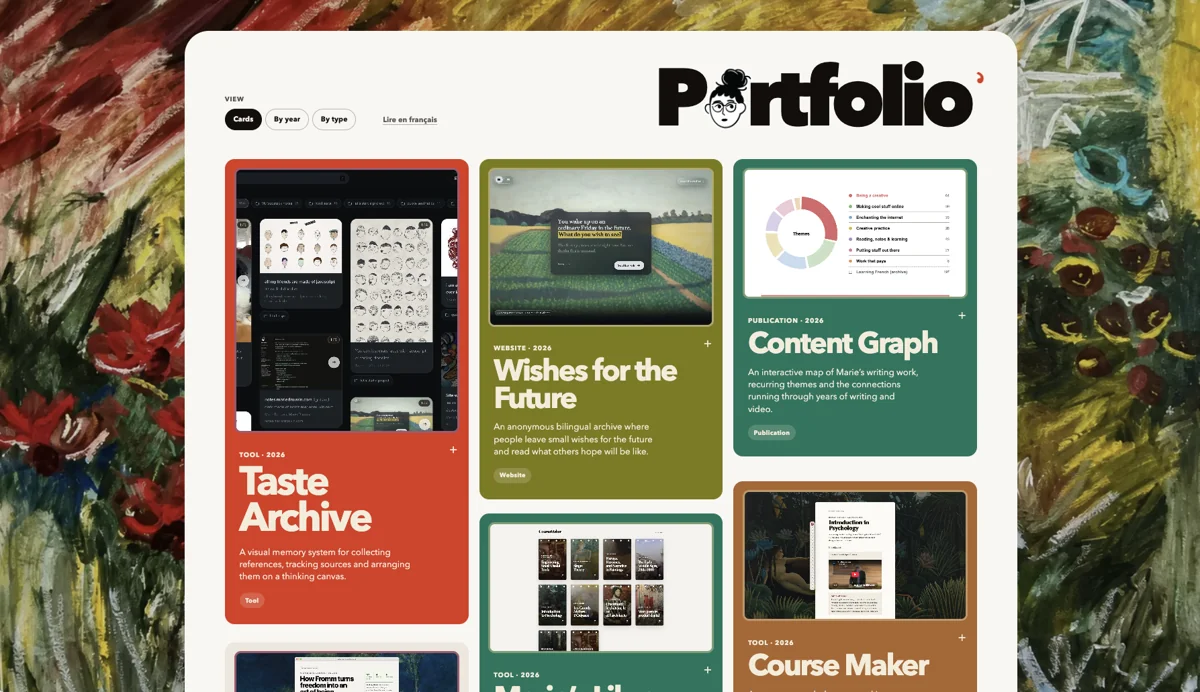
There are my websites, of course:
- this one
- my french one
- the one I built for my parents' guesthouse
- my website for the future, which I talked about here -> i made a website for the future
- and now, the portfolio itself
My tools (probably my favorite category, because I'm still not over how I can build my own tools now) :
- the Morning Kickstart, which gets my daily tasks started for me -> i made it easy to start my day
- the Taste Archive -> i made my own thinking app
- the Course Maker, which helps me turn video and internet content into HTML courses
- the Substack Feed Blocker, which I talked about on Les Papiers
- the Tweet Inbox, which is a private place to tweet without actually tweeting (lol, I'll expand on that another time, it needs to evolve some more)
- Marie's Library, which is my private library for reports, courses from the Course Maker, and other stuff
My skills (a forever-expanding category - this is only a selection):
- PeopleDex : a skill that helps me understand my favorite creators better by building profiles of their ideas, and references
- ReadytoPublish : a skill that turns a near-final draft for Les Papiers into a publishable piece (adding links, format...)
- Youtube Description : a skill to write my youtube descriptions for me
- Project Creation : the first skill I'm reaching for when I'm making a new thing, it builds the folder architecture I need and lays down the basic rules for all of my projects
- MD Notification: adds a new notification to my mariedrouvin.com website
- Add to Notes: publishes a piece from Obsidian to notes.mariedrouvin.com
- Month Review: compiles my daily notes and all the context from the month into a report
I've also added books and publications, two non-AI categories:
- Organons
- How to live in peace with your creative ambition
- Les Papiers
- the Content Graph : a webpage that compiles and categorizes my published writing
ALL of this (except Les Papiers) was created this year. Most of it, this summer. And I'm saying that because I have a tendency to tell myself I really slacked off this summer LOL.
I had so much fun on this build. Despite it being very different, it still has my style. I think this has to do with the colors (they are the same palette as the taste archive cards). Oh and the painting! I love to use paintings to add texture. Kandinsky on mariedrouvin.com, Valotton on Wished for the Future, and here, the background is an original Marie Drouvin. It's Botanical 1, which you can see in full on the handmade page.
Each item in the portfolio opens in a slide-out panel, with links to see it live or read more about it, when available.
As usual, the site is bilingual, follows your system's light or dark mode, and includes no tracking.
Check it out here : portfolio.mariedrouvin.com